S3, Sharp, and CloudFront: the ReD Sposi media pipeline
27 March 2026

The first prototype of the ReD Sposi gallery used GridFS — MongoDB's file storage layer. It worked: a guest uploaded a photo, Express saved it to GridFS, and whenever the app requested a thumbnail the backend read the file, resized it on-the-fly with Sharp, and streamed it over HTTP.
Simple. And for a prototype, more than enough.
The problem is that "on-the-fly" has a cost. Every thumbnail request hits the backend, which has to open a GridFS connection, read the full file into memory, resize it, and respond. For a gallery with hundreds of photos and a three-column grid that loads them all at once, that cost multiplies fast. And the backend is already doing enough: handling auth, chat via Socket.IO, push notifications, RSVP.
There was no good reason to use the same Node.js process to serve static files.
The Photo model
Before getting to the solution, it helps to understand how the data is structured.
The Photo model has a storageType field that determines how the URI is constructed when the backend responds to app requests:
With storageType: "gridfs" the backend builds the URI on the fly: BASE_URL/api/gallery/file/{id}?size=thumb. With storageType: "url" the URL is already final and points directly to CloudFront.
This field was the key to a smooth migration. Photos uploaded before the switch still have storageType: "gridfs" and continue to be served by the backend. New photos have storageType: "url" and point directly to CloudFront. No big bang — the change was incremental and reversible.
The upload pipeline
When a guest uploads a photo, the app sends a multipart request to POST /api/gallery/upload. On the server side:
- Reception — Multer handles the multipart body and saves the file to a temp directory.
- Processing with Sharp — Two versions are generated: a thumbnail (max 400px on the long side) and a medium version (max 1200px). Sharp compresses to JPEG at quality 80.
- Upload to S3 — Both versions are uploaded via
PutObjectCommand. Keys follow a fixed scheme:gallery/{weddingId}/{photoId}/thumb.jpgandgallery/{weddingId}/{photoId}/medium.jpg. - Saving to MongoDB — The
Photodocument is created withstorageType: "url"and the two CloudFront URLs already calculated as final values. - Cleanup — The temp file is deleted.
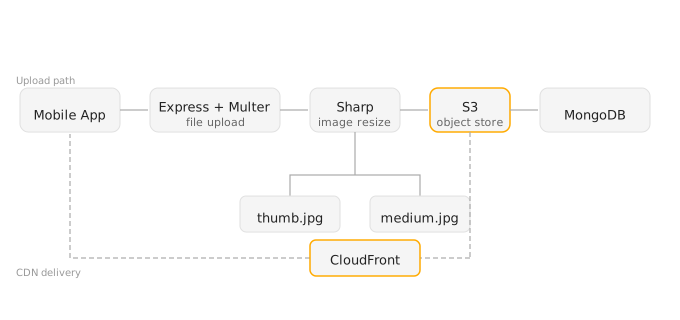
The thumbnail is generated at upload time, not when it's requested. The backend never does on-the-fly resizing for new photos.
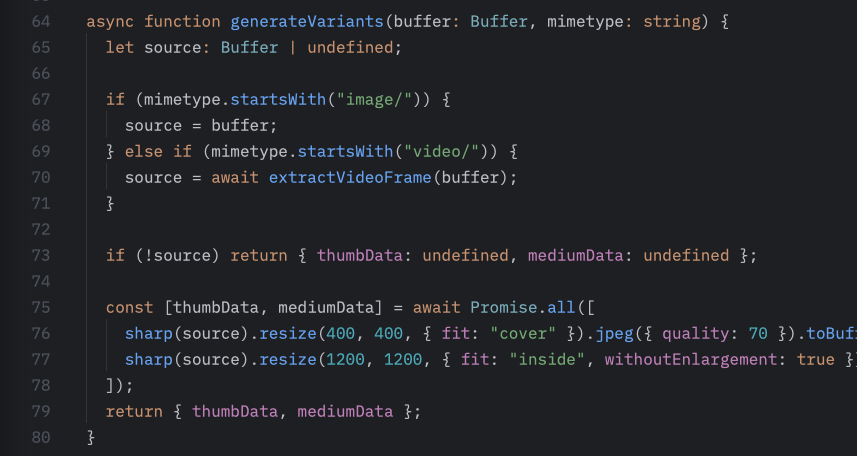
Videos
Videos follow a slightly different path.
The mobile app uses expo-video for playback, so the format needs to be MP4 with H.264. When a video arrives, it first goes through ffmpeg for transcoding, then Sharp extracts the first frame to use as a thumbnail. The transcoded video is uploaded to S3 as gallery/{weddingId}/{photoId}/video.mp4, while the frame thumbnail becomes thumb.jpg following the same scheme as photos.
The contentType field on the Photo model tells the app whether to render an <Image> or a VideoView. The grid always shows the thumbnail — photo or video — and only when opening the lightbox does the app choose the right component.
CloudFront
CloudFront sits in front of the S3 bucket and does three things:
Geographic distribution. The server is in Europe. Guests who open the app from abroad — or just on a slow connection — load images from the nearest edge node, not from the physical server.
Caching. Gallery images never change after upload. Cache-Control: max-age=31536000, immutable — one year. CloudFront never makes a second request to S3 for the same key after the first one.
Separation of concerns. The Express backend no longer handles file traffic. Media requests go directly to CloudFront. The backend only receives real API calls: auth, RSVP, moderation, chat.
The CloudFront configuration for this case is minimal: S3 origin, no custom behaviors, HTTPS enforced, default cache behavior with a long TTL. No Lambda@Edge, no CloudFront Functions — no need.
What changed in the app
On the mobile side, the change is almost invisible. The mapPhoto() function in src/api/gallery.ts builds URIs from the backend response, and for new photos it returns CloudFront URLs directly without going through the backend API. The app doesn't know (and shouldn't) whether an image comes from GridFS or CloudFront — it always uses thumbUri for the grid and uri for the lightbox.
Admin moderation loads images with an Authorization header for old GridFS photos, and without one for CloudFront — S3 URLs served via CloudFront are public to anyone with the URL, but not indexable. That's an acceptable tradeoff for a private gallery gated behind an invite code.
The main lesson
What convinced me to do this migration wasn't performance — though it improved. It was separation of responsibilities.
A Node.js server is good at handling application logic, WebSocket connections, and data transformations. It's bad as a CDN. Using it for both isn't a mortal sin, but it's a debt you pay at the worst moment: when the app has more users and the server is already under pressure for other reasons.
S3 for permanent storage, Sharp for transformations at the right time (upload, not request), CloudFront for distribution: each piece does one thing. This is the kind of architecture that doesn't ask for your attention once it's running.
For a few hundred wedding guests, it probably would have been fine before. But building the right thing now is easier than fixing it under pressure in August.