Expo Router Changed How I Think About Navigation
4 April 2026
For years I managed navigation in React Native the standard way: stack navigator, tab navigator, configuration at runtime in a dedicated file. React Navigation is a mature, well-documented tool, and I used it without any particular issues.
Then I adopted Expo Router for ReD Sposi, and I realized the problem wasn't the library. It was the mental model.
How It Used to Work
With React Navigation, screen structure is declared in code. You have a NavigationContainer, inside it a Stack.Navigator, inside that Stack.Screen components, each with an associated component. If you want tabs, you nest a Tab.Navigator. If you want modals, you add them as screens with a different presentation.
The result is a tree declared explicitly, often in a single file that grows with the app. It's not bad — it's just that the navigation structure lives separately from the file structure.
// navigation declared in code
<Stack.Navigator>
  <Stack.Screen name="Home" component={HomeScreen} />
  <Stack.Screen name="Profile" component={ProfileScreen} />
  <Stack.Screen name="Settings" component={SettingsScreen} />
</Stack.Navigator>
How It Works Now
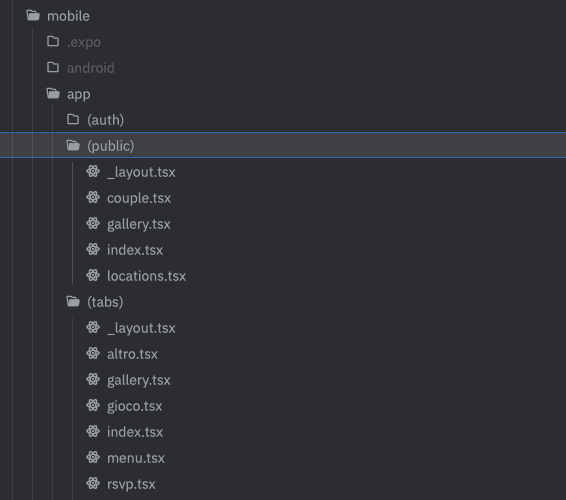
With Expo Router, navigation is the filesystem. You create a file, a screen exists. The folder structure is the app structure.
app/
  (tabs)/
    index.tsx       → main tab
    gallery.tsx     → gallery tab
    chat.tsx        → chat tab
  invite.tsx        → screen outside tabs
  _layout.tsx       → root layout
No navigation configuration file. No array of screens to keep synchronized with actual components. The structure is the documentation.
The Change I Didn't Expect
The surface difference is that you write less configuration code. But the real change is where the map of the app lives in your head.
With React Navigation, I have to keep two parallel structures in mind: the file structure of the components and the navigation structure configured elsewhere. If I add a screen, I update both places. If I remove a screen, I have to remember to remove it from the navigator too. These are structures that tend to diverge.
With Expo Router, there's only one structure. The file is the screen, the folder is the group, the _layout.tsx is the container. When I look for where a screen lives, I look in the filesystem — not in a configuration file that might have grown arbitrarily complex.
This isn't an ergonomics advantage. It's a cognitive advantage: there's one less thing to keep in mind while working.
The Parallel with Next.js
Expo Router is built on the same ideas as the Next.js App Router — not a coincidence, it's the same team. And the parallel holds up reasonably well.
Like in Next.js, you have _layout.tsx instead of layout.tsx, index.tsx for the root of a folder, groups in parentheses (group) to organize screens without adding segments to the URL (or in this case, to the navigation). If you have experience with the Next.js App Router, most of the mental model is already yours.
For me, working in both environments, this almost entirely eliminated the context-switching cost between web and mobile from a navigation perspective.
Where You Still Feel the Weight
Expo Router isn't without rough edges.
Deep linking and navigation parameter handling are more verbose than they should be — useLocalSearchParams() works, but typing is weak by default and requires some manual work to be safe.
Modals and native presentations (bottom sheet, full-screen modal) are configured in _layout.tsx and the mechanism is less intuitive than the freedom you get with React Navigation.
And Expo Router only makes sense inside the Expo ecosystem. If you're building with bare React Native without Expo, it's not an option.
Is It Worth It?
For most new projects in Expo: yes. The file-based model reduces structural complexity in a real way, and alignment with the Next.js App Router lowers cognitive cost if you work in both environments.
But the strongest reason isn't technical — it's that an app whose structure you can understand by opening the file explorer is an app that's easier to maintain, explain, and grow. And that's always true.